Workflow
‣
Create Spaces in the Electrical Model
- Turn on the Room Bounding checkbox in the Type Properties of the linked Architectural model.
- Place Space elements in the areas where you’ve added Lighting to your building model.
‣
Create a Space Schedule Summarizing the Power & Lighting Loads
- Create a Space Schedule that includes the Space elements, including these fields:
- Level
- Number
- Name
- Area
- Specified Power Load
- Specified Lighting Load
- Average Estimated Illumination
- Sort the rows by the Number field
- Do not sort or group by any other field
- Calculate totals for the Specified Power Load and Specified Lighting Load fields
- Include a Grand Total that displays the Title, Count, and Totals
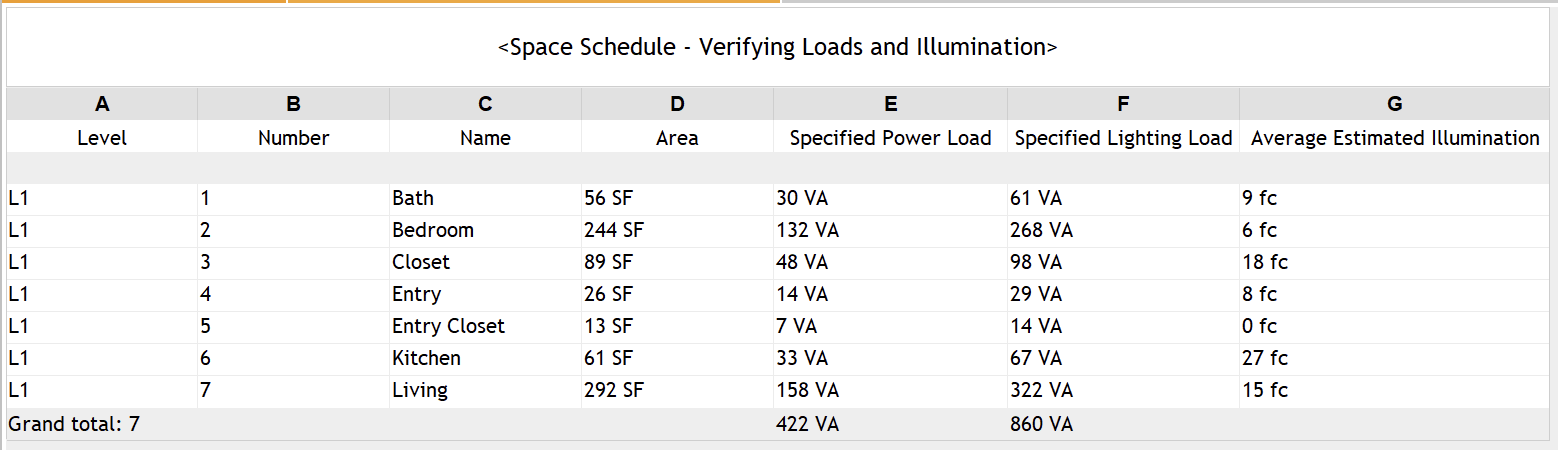
You can download this model file here:

AI Prompts
‣
Creating a Space Schedule to Confirm Power & Lighting Loads
Prompt | Tool Options
🟢 = Autodesk Asst
🔵 = Revit MCP
🟣 = Python + Dynamo |
Create a Space Schedule that includes the Space elements, including these fields:
◦ Level
◦ Number
◦ Name
◦ Area
◦ Specified Power Load
◦ Specified Lighting Load
◦ Average Estimated Illumination
• Sort the rows by the Number field
• Do not sort or group by any other field
• Calculate totals for the Specified Power Load and Specified Lighting Load fields
• Include a Grand Total that displays the Title, Count, and Totals | 🟢 🔵 🟣 |
‣
Claude Response
I'll create the Space Schedule directly in your open Revit model. First, checking the Revit connection.
The schedule was likely committed before an output line failed (newer Revit drops ElementId.IntegerValue). Verifying what was created:
I created the Space Schedule in your Sample Apartment Electrical System with Spaces model, set up the way you asked. I checked it afterwards:
- Fields: Level, Number, Name, Area, Specified Power Load, Specified Lighting Load, Average Estimated Illumination.
- Sorting: by Number only, ascending. There's no grouping and no other sort field, and every space gets its own row.
- Totals: Specified Power Load and Specified Lighting Load both have totals turned on.
- Grand Total: shows the title, count and totals. The bottom row reads Grand total: 7 | 422 VA | 860 VA.
I named it "Space Schedule" to match your request; your existing "Space Schedule - Average Estimated Illumination" wasn't touched. I didn't save the model, so save it when you're ready to keep the change.