
ChangeFlow-A Parametric Construction Change Impact Analyzer

Brief Overview (ReadMe)
ChangeFlow is a Dynamo and Generative Design based decision-support tool developed in Revit that helps evaluate how construction-phase design changes impact project schedule, construction cost, and coordination risk.
The tool was developed to improve transparency and collaboration between design teams and construction management teams during project delivery. During construction, even small design changes can create significant downstream impacts on schedule, cost, prefabrication workflows, sequencing, and site coordination. However, these impacts are often difficult to evaluate quickly because information is fragmented across BIM models, schedules, and spreadsheets.
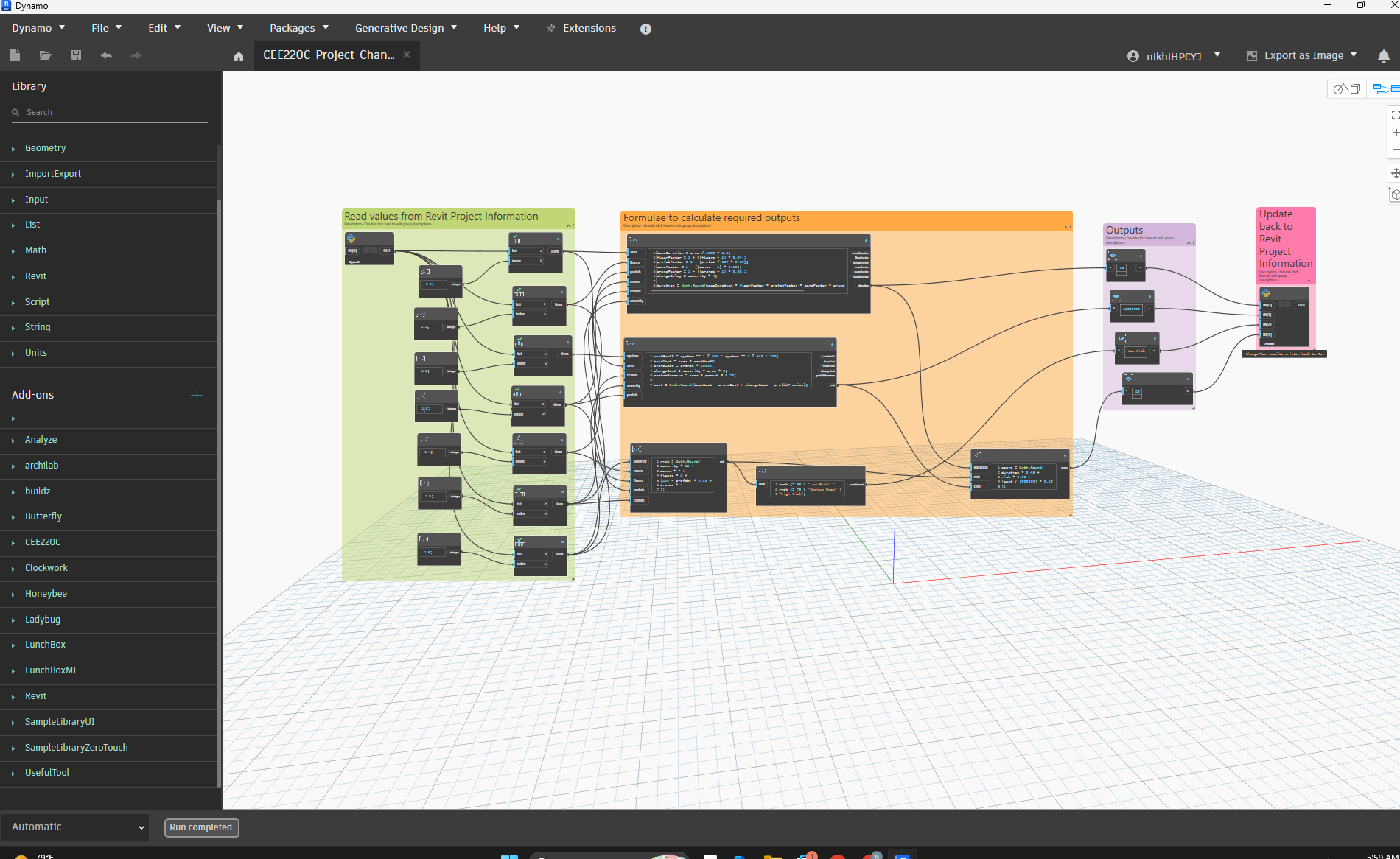
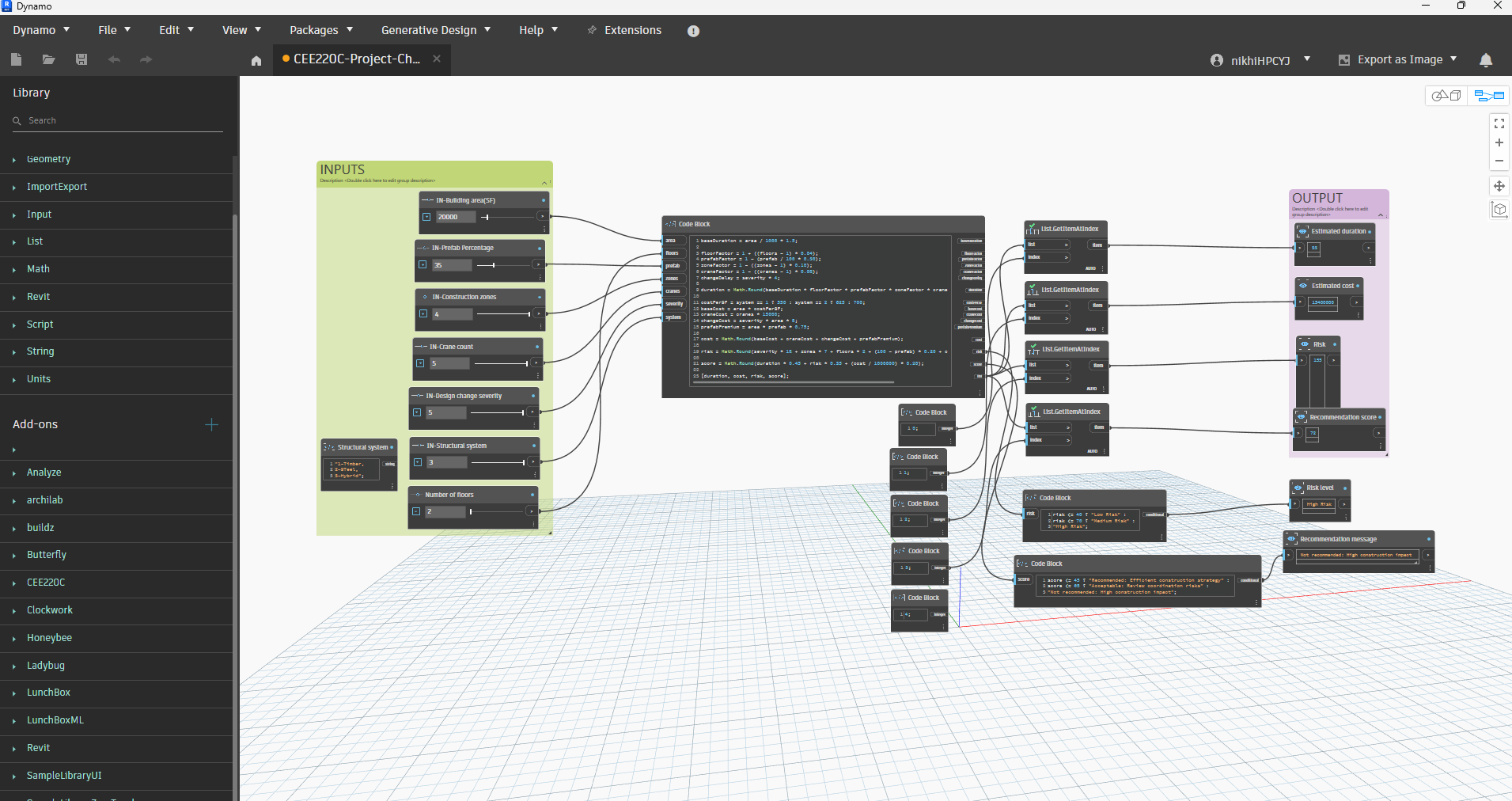
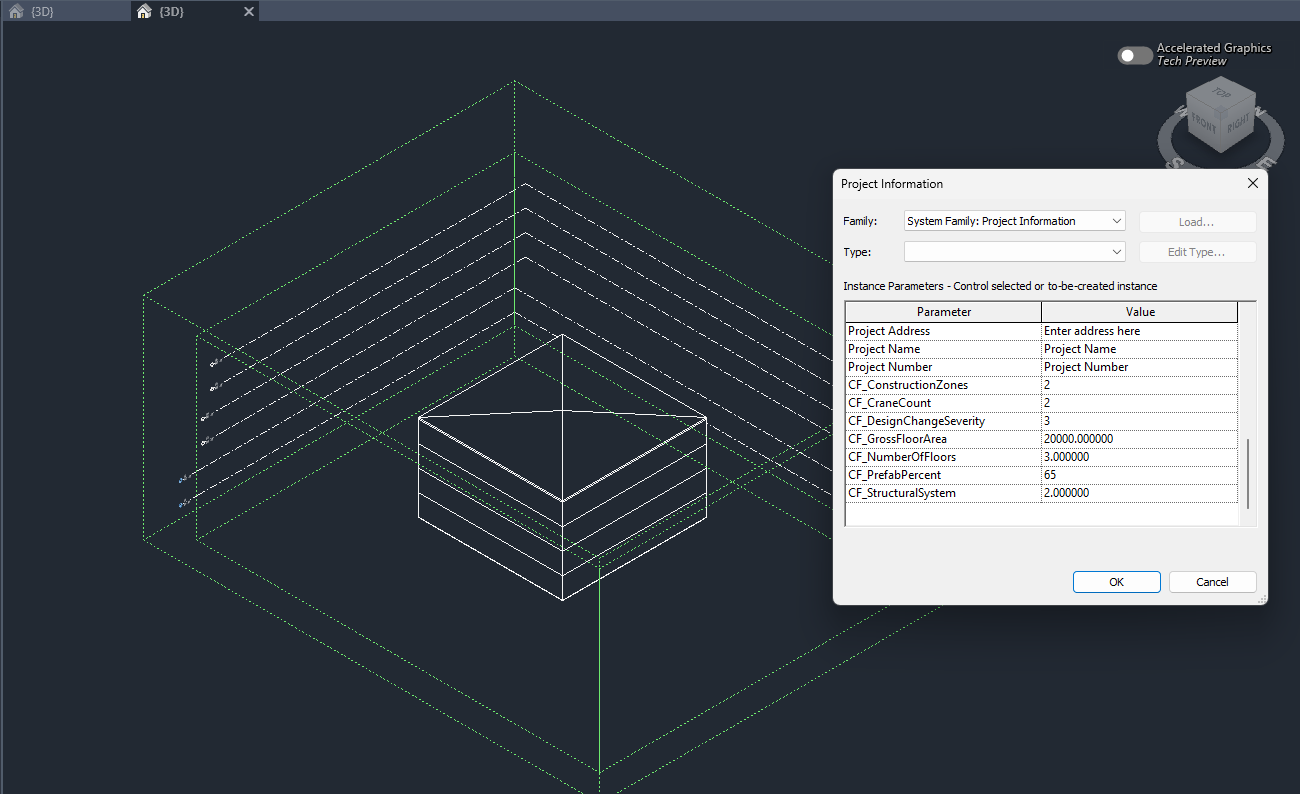
ChangeFlow creates a simplified BIM-connected workflow where users can modify project assumptions such as gross floor area, number of floors, structural system, prefabrication percentage, construction zones, crane count, and design change severity. Dynamo then calculates the resulting impacts on duration, cost, and coordination risk and writes the results back into the Revit model.
The tool also includes a Generative Design workflow that automatically evaluates multiple combinations of design and construction strategies to help users compare tradeoffs and identify efficient construction solutions.
Why Use ChangeFlow?
Construction-phase decision-making is often reactive and disconnected between disciplines. ChangeFlow was developed to demonstrate how parametric and generative workflows can support more collaborative and transparent project delivery.
The tool helps users:
- Quickly understand the impact of design changes during construction
- Compare different construction strategies
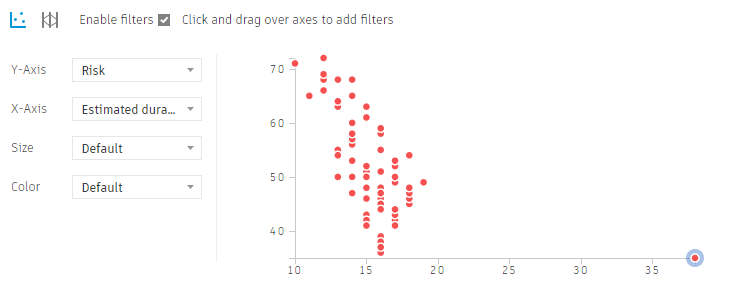
- Explore tradeoffs between duration, cost, and coordination complexity
- Support integrated decision-making between design and construction teams
- Test multiple alternatives through Generative Design workflows
Unlike a traditional spreadsheet calculator, ChangeFlow connects design assumptions stored in the BIM environment with rule-based construction evaluation logic and generative option exploration.
Intended Users
- Construction Managers
- BIM / VDC Teams
- Design Teams
- Project Coordinators
- IPD Teams
Timeline / Scope Breakdown
Phase | Scope / Deliverable | Estimated Hours |
1. Research & Logic Development | Define project idea, identify construction-management use case, develop rule-based formulas for schedule, cost, and coordination risk | 2 hrs |
2. Revit Model Setup | Create simplified BIM model and configure Project Information parameters for Dynamo connection | 1 hr |
3. Dynamo Graph – Revit Connected Workflow (Circular) | Build Dynamo graph that reads Revit inputs, calculates impacts, and writes outputs back into Revit to create a circular BIM feedback workflow | 3.5-4.5 hrs |
4. Dynamo Graph – Generative Design Workflow | Create Generative Design compatible graph with inputs/outputs and run study iterations | 2.5 hrs |
5. Testing & Calibration | Test multiple scenarios, adjust formulas/ranges for stable outputs, and compare generated outcomes | 1.5 hrs |
6. Documentation & Final Packaging | Prepare overview, workflow explanation, formulas, screenshots, teaser image, and assignment documentation | 2.5 hrs |
Total Estimated Time: 12.5 Hours
Inputs
The following project parameters can be modified by the user:
Input | Description |
Gross Floor Area | Total building floor area |
Number of Floors | Building height / vertical complexity |
Structural System | Timber, Steel, or Hybrid |
Prefabrication Percentage | Degree of offsite construction |
Construction Zones | Number of simultaneous work zones |
Crane Count | Number of cranes used onsite |
Design Change Severity | Magnitude of construction-phase design change |
Outputs
The tool calculates:
- Estimated construction duration
- Estimated construction cost
- Coordination risk score
- Recommendation score
The Generative Design workflow compares multiple options and identifies combinations that minimize duration, cost, and coordination complexity.
How the Calculation Logic Was Developed
The formulas used in ChangeFlow are simplified rule-based relationships intended to represent realistic construction management trends rather than exact industry estimates. Since this project is a proof-of-concept prototype, the calculations were designed to demonstrate logical relationships between construction variables and project outcomes.
Schedule Duration Logic
Schedule duration increases with:
- larger building area,
- more floors,
- and more severe design changes.
Schedule duration decreases with:
- higher prefabrication percentages,
- more construction zones,
- and additional cranes due to parallel work and increased installation efficiency.
The coefficients used in the formulas were selected to create reasonable proportional relationships between variables while maintaining stable outputs for the Generative Design study.
Cost Logic
Construction cost is based on:
- gross floor area,
- structural system,
- crane usage,
- prefabrication premium,
- and change-related rework costs.
Different structural systems use different assumed costs per square foot:
- Timber = lower material cost
- Steel = medium cost
- Hybrid = higher cost
Additional costs are added for:
- cranes,
- prefabrication,
- and severe design changes.
These assumptions were intentionally simplified to create a prototype workflow focused on comparative decision-making rather than detailed cost estimation.
Coordination Risk Logic
Coordination risk increases with:
- more severe design changes,
- more construction zones,
- additional cranes,
- greater building complexity,
- and lower prefabrication percentages.
The coordination risk score was developed to represent the increased communication and sequencing complexity that occurs when more trades, work zones, and logistics systems operate simultaneously during construction.
The risk score is not intended to represent a real industry risk index, but rather a comparative metric to evaluate relative coordination complexity between design alternatives.
How Users Interact With ChangeFlow
Dynamo graph-1 : Revit-Connected Workflow
- Users open the Revit project and modify project-level assumptions in Project Information.
- Number of construction zones
- number of cranes
- prefab percentage
- design severity
- structural system(timber,steel,hybrid)
- gross floor area
- number of floors
- The Dynamo graph reads those values directly from Revit.
- Dynamo calculates updated duration, cost, and coordination risk values.
- The outputs are written back into the Revit model.
This workflow demonstrates how BIM-based project assumptions can be connected to downstream construction evaluation logic.
Dynamo Graph-2: Generative Design Workflow
- Users launch the Generative Design study in Revit.
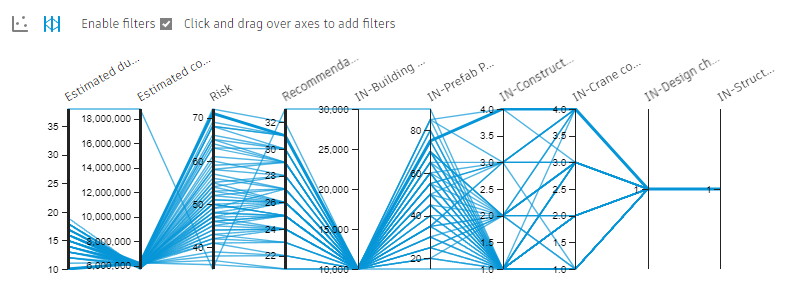
- The study automatically tests multiple combinations of design and construction variables.
- Each option is evaluated based on:
- duration,
- cost,
- and coordination risk.
- Users compare outcomes and identify preferred strategies.
This workflow allows users to explore tradeoffs between different construction approaches rather than evaluating only one option at a time.
Minimum Requirements
- Autodesk Revit
- Dynamo
- Revit Generative Design Tools
MVP vs. Nice-to-Have Features
MVP (Implemented)
- Revit-connected Dynamo workflow
- Rule-based impact calculations
- Generative Design option exploration
- BIM parameter integration
- Circular workflow where Dynamo updates outputs back into Revit
- Construction duration, cost, and coordination risk outputs
Nice-to-Have Features (Future Expansion)
- Automatic floor-area extraction from Revit geometry
- Primavera / scheduling software integration
- Real cost database connection
- Carbon impact analysis
- Construction logistics simulation
- Dashboard visualization
- Excel export automation
Video Link
https://drive.google.com/file/d/1Co7AXhkH1LbQHZaqrf2cQ5995zFy3yFs/view?usp=sharing
Autodesk Link
https://acc.autodesk.com/build/files/projects/ef862b37-e023-4ef6-8ec3-3615621538bf?folderUrn=urn%3Aadsk.wipprod%3Afs.folder%3Aco.rRr7YGcVQ9W7E6joT_REsw&viewModel=detail&moduleId=folders
Overview Images


